For tutoring centers

Run your center from first enquiry to paid invoice

Enrollment, classes, teaching, attendance, tuition and parent reports in one system. Each role sees its own part, and what is entered once flows through the rest.

Free plan available, no credit card needed.

Tuition totals, a family's invoices and a recorded payment

Fewer tools to reconcile at the end of the month

Many centers keep rosters in a spreadsheet, talk to parents in group chats, store materials in a cloud drive and test in yet another app. Someone then matches it all up by hand. CLASSQR keeps the enrollment form, the class list, attendance, tuition and the parent report in the same record, so nothing is typed twice.

What changes in a center's week

An enrollment form on a center website, then the new lead in the Leads list
Enrollment

A website that turns visits into enrolled students

Build the center's website from ready-made blocks: open classes with schedule and tuition, teacher profiles, testimonials, FAQ and a sign-up form. Each sign-up becomes an application your staff can call, book for a trial and enroll in one click.

  • Care statuses and follow-up dates show which families are waiting on you.
  • A conversion report shows where your enrolled students came from.
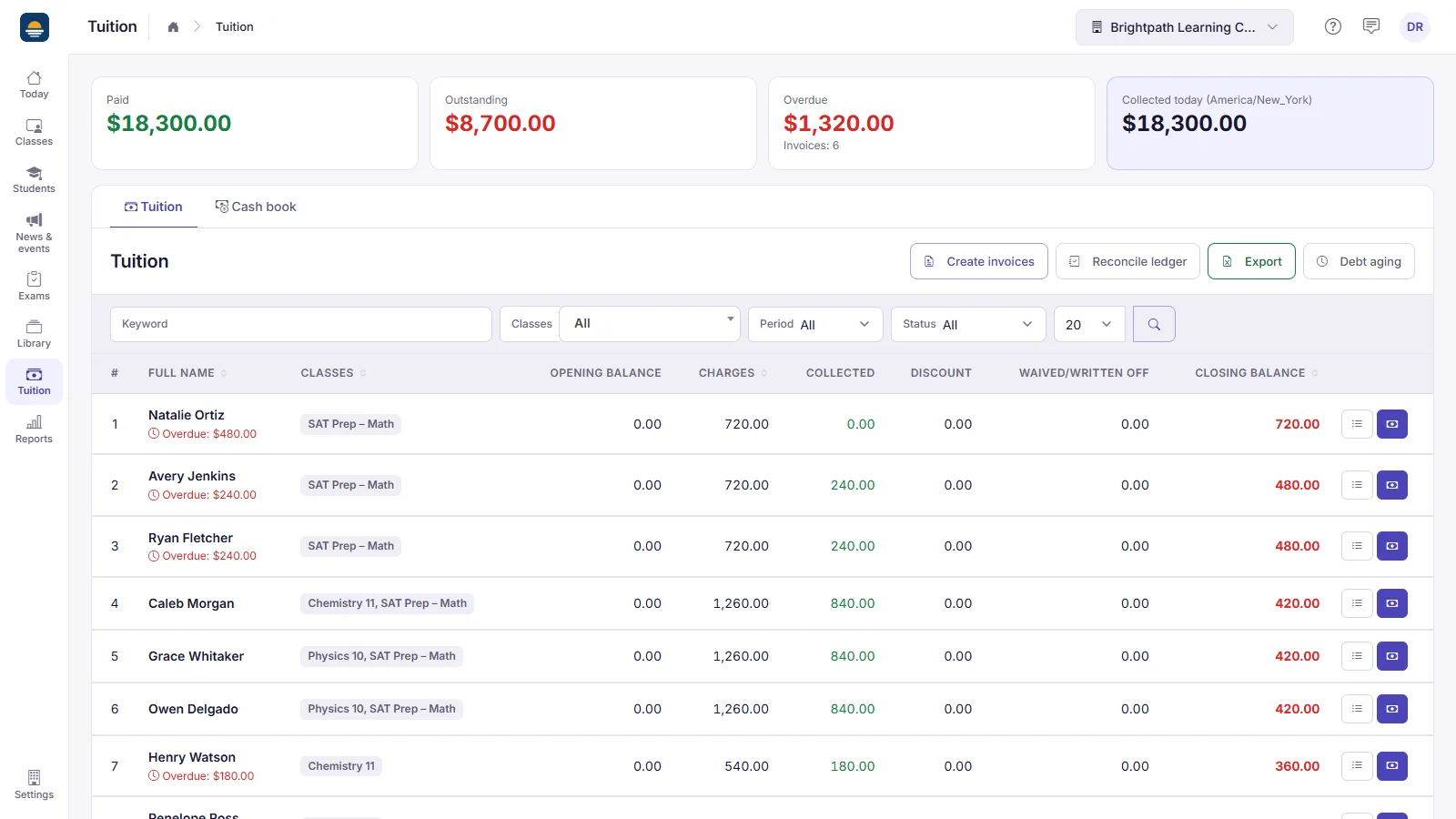
Tuition totals, a family's invoices and a recorded payment
Tuition

Invoices, reminders and a clear view of who owes what

Create tuition invoices, send reminders, and record cash or bank transfers with a receipt number. Parents can also pay online through your own Stripe account, so the money goes straight to you and CLASSQR never takes a cut.

  • Paid, outstanding and overdue totals, plus debt aging by family.
  • Scheduled automatic reminders on the Standard and Pro plans.
How tuition and reminders work
QR attendance, then the weekly report a parent receives
Parents

Parents see progress every week, without an app

Teachers take attendance by QR code and tap participation notes in class. Each week the center gets a report per student, built from attendance, notes and points, checks it and sends it by email with a private link.

  • Approve the reports in bulk, then send them in one step.
  • The parent page also shows the tuition due, with a button to pay.
Drafting a test from one sentence, then reviewing the questions
Teaching

One library for every class and teacher

Keep curricula, question banks and tests in the center library so every teacher starts from the same material. Run an exam across several classes, or let a teacher draft a test with the assistant and review it before use.

  • Every item shows whether it belongs to the center or to a teacher.
  • Live quizzes and QR answer sheets work in every class.

Everyone sees only their part

Invite people by email, give each one a role, and adjust what each role may view, add, edit or delete.

Owner and managers

Every class, the reports and the settings.

Teachers

Only the classes they teach or were invited to.

Academic staff

Students, schedules and follow-up, with tuition read-only.

Cashiers

Payments, receipts and the cash book, without class content.

Parents

Reports and invoices by email, through a private link.

Getting started

1

Create the center

Choose its name, web address, time zone and currency.

2

Add classes and people

Create classes, import students from Excel and invite your teachers and staff.

3

Open enrollment and billing

Publish the website, list your open classes and set up tuition and payment methods.

Read the full center setup guide

The center's data stays the center's

The center controls its student data, and CLASSQR processes it under the center terms. Data is never sold or used for advertising, and the curricula and tests you write are never made public.

Read the center terms

Pricing

Run a center

Staff roles, tuition, enrollment and a center website. Standard and Pro are priced by active student count. Pay for 12 months, get charged for only 10.

Free plan
$0

For a small center or school that is just starting.

  • Up to 30 students, 3 classes, 2 users
  • Lesson planning, question bank, practice assignments, exams, QR attendance
  • Weekly reports to parents by email, tuition tracking
  • Your own page for your class: class-name.classqr.com
  • 40 AI credits per month to try test generation
Start for free
Pro plan
$48/month

Everything in Standard, plus your own domain and branding. Priced by active student count:

  • Up to 100 students: $48/month
  • Up to 250 students: $68/month
  • Up to 600 students: $148/month
  • Your own domain — CLASSQR is never shown
  • 600 AI credits per month, plus priority support
  • Multiple locations? Contact us for custom pricing.
Try Pro

AI credits reset every month. Need more? Extra credit packs from $9.99.

Frequently asked questions

Can a center with several locations use it?

Yes. Each location is its own center with its own address, teachers and students, and the owner switches between them. Build a curriculum once and import it into classes at each location.

Does CLASSQR take a percentage of tuition?

No. Online payments go through the center's own Stripe account, and staff record cash and bank transfers. CLASSQR never holds the money.

Do parents need an app?

No. Reports, invoices and reminders arrive by email, and each one opens through a private link in the browser.

Can a teacher see students from other classes?

No, unless they have the Manager role. A teacher only sees the classes they teach or were invited to.

Can we use our own domain?

Yes, on the Pro plan. On your own domain the enrollment page, sign-in and student area show no CLASSQR name or logo.

We keep everything in spreadsheets today. How do we move?

Import each class's student list from Excel, and the system creates an account and a student ID for each row. Attendance, tuition and reports then build on that list.

Bring your center into one system

Start on the free plan and add classes, staff and tuition at your own pace.

Create your center