Parents who pay for tutoring want to know two things every week: is my child keeping up, and is there anything I should do at home? A short weekly report answers both and stops most "how is she doing?" calls before they start. The hard part is not writing one good report. It is writing twenty of them every Friday without the quality dropping. This article covers what to put in the report, gives an example you can copy, and shows a routine that keeps it to minutes.
What parents actually read
Most parents open the report on a phone and read it in under a minute. They look for a name, a sign that things are fine or not, and one thing to do. So the report should be short, start with the conclusion, and keep the same structure every week so parents know where to look.
The five parts of a useful weekly report
- One-line summary. The conclusion first: "A good week: Ryan spoke up in class and finished every warm-up."
- Attendance and participation. Sessions attended, and the concrete things you noticed: answered a question at the board, helped a classmate, was distracted in the second half.
- Results. Scores from tests, quizzes or homework this week. If there were none, say so; a blank is also information.
- Strengths and what needs work. Name topics, not personality traits. "Solving one-step equations is solid; word problems with two steps still need practice" is more useful than "needs to focus".
- One request for home. One small, specific action: "15 minutes of practice on Tuesday and Thursday evenings." One request gets done; five get ignored.
If you also handle tuition, a line with the amount due and how to pay saves a separate message.
An example you can adapt
Ryan Fletcher, SAT Prep: Math, week of November 2
A good week. Ryan spoke up in class and earned 1 participation point.
We worked through the linear equations warm-up. Next week we start systems of equations: 15 minutes of practice on Tuesday and Thursday evenings will make a big difference.
Tuition due: $480.00. You can pay from the link below.
Writing tips that save time
- Take notes during class, not on Friday. A tap or a tick next to a name when something happens is enough. Reconstructing a week from memory is where the time goes.
- Write one praise and one ask. Every student gets both, including the strongest and the weakest.
- Avoid labels. Describe what happened ("did not hand in homework twice") instead of judging ("lazy").
- Send at the same time each week. Parents start expecting it, and a missing report becomes a signal you can act on.
How to send weekly reports in ClassQR
ClassQR builds a draft for every student from what was recorded during the week: the participation marks you gave in class, online tests and practice (with strengths and weak spots by topic), and class quiz games. The draft is built from those numbers without AI, and nothing is sent until a person approves it.
- Generate the drafts. Open the class, go to Result > Parent report, pick the week, and click Generate weekly report. Each student gets a draft with notes written from the week's data, and each row shows the parents who will receive it.
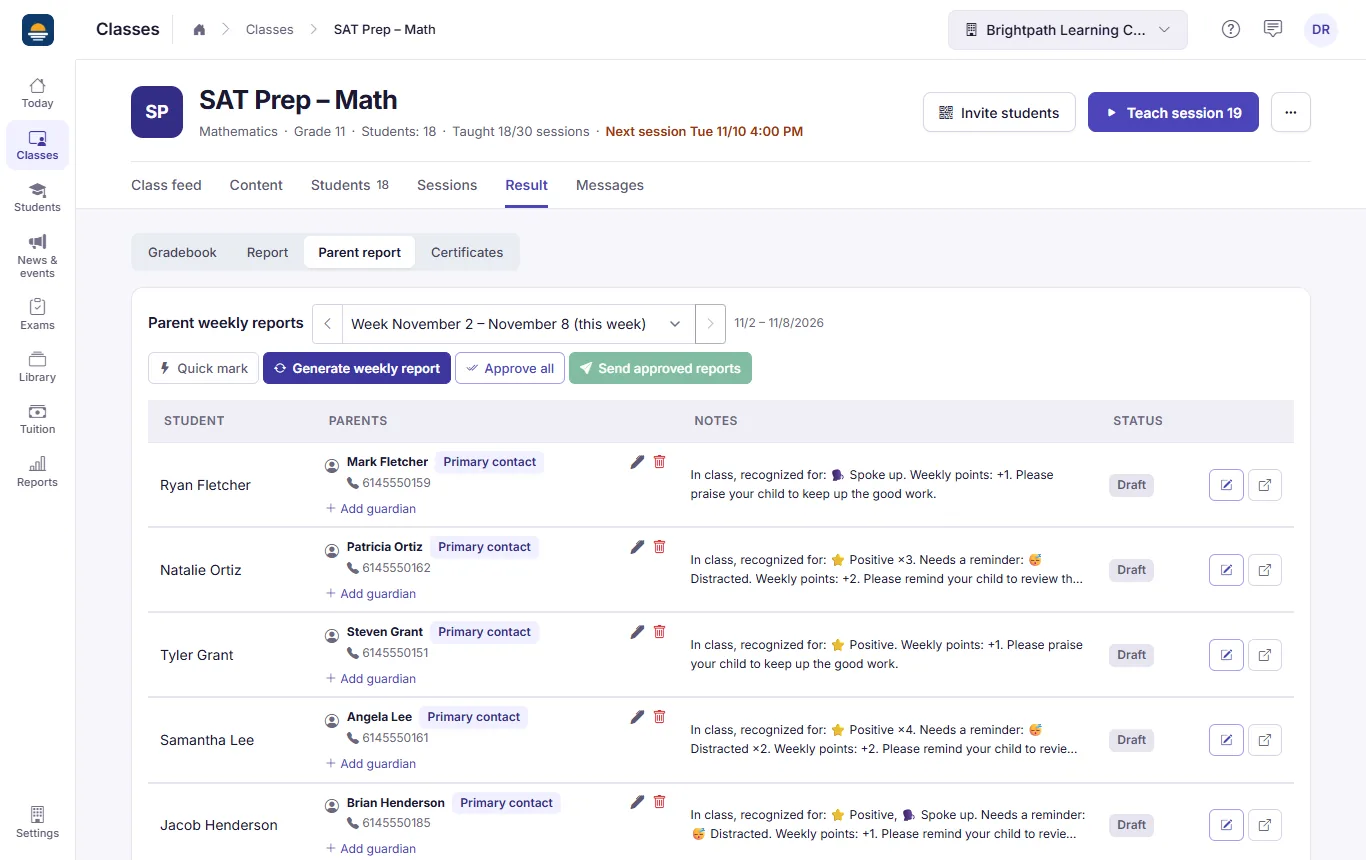
One draft per student, with notes built from the marks given in class.
- Review and add your message. Click View / edit notes to change the notes and add a Teacher's message. Save & approve approves it and moves to the next student, so you can go through the class in one pass. Approve all approves every draft at once when the notes need no changes.
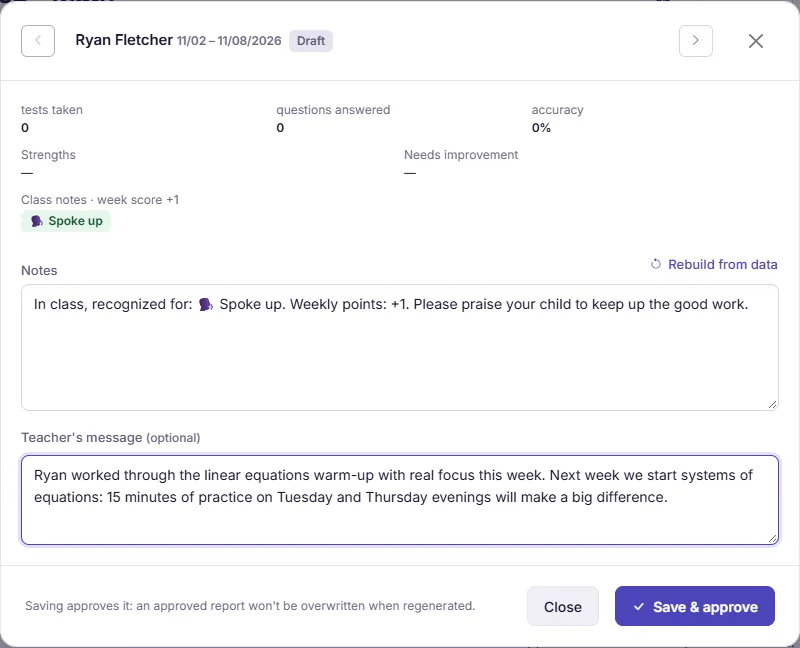
The editor: the week's numbers at the top, the notes, and your own message.
- Send. Click Send approved reports. Only approved reports go out. Parents get an email (with an in-app notification as a fallback) containing a link that opens without signing in.
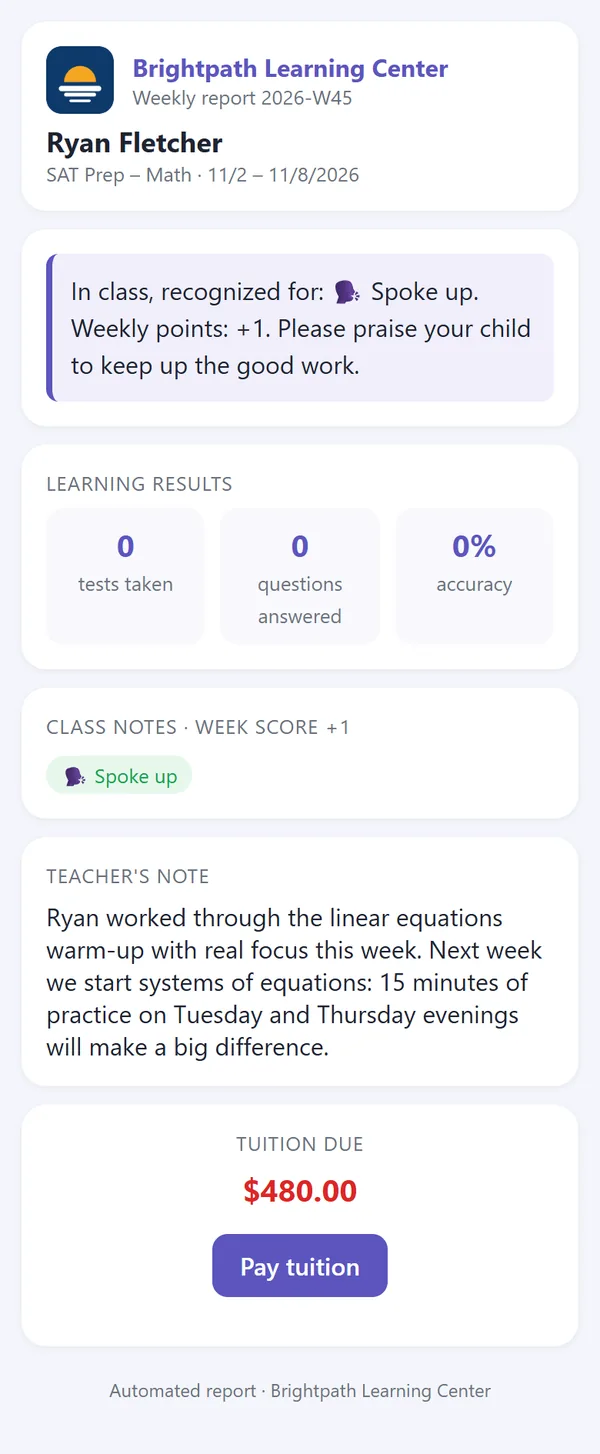
What the parent sees. This class only did in-class work this week, so no tests show up under Learning results.
A few details worth knowing:
- Generating again refreshes the numbers. A draft's notes are rebuilt, but an approved or sent report keeps your wording.
- If you edit a report after sending it, it is not sent again; parents see the new version when they reopen the link.
- When the student has an outstanding balance, the report shows the amount due and a link to the payment page.
- Weekly reports are available on every plan. For per-session reports and how participation marks are given in class, see QR attendance, participation chips, and reports to parents.