For teachers

Your own classroom toolkit, free to start

For private tutors and teachers who run their own classes. Quizzes, tests, lessons, attendance and grades live in one personal workspace, so you spend less time preparing and more time teaching.

No credit card. Runs in any browser: on the board, a laptop or a phone.

Live quiz: students answer on their phones while the leaderboard updates

A week of teaching, in one place

Each clip was recorded in a personal workspace with sample classes.
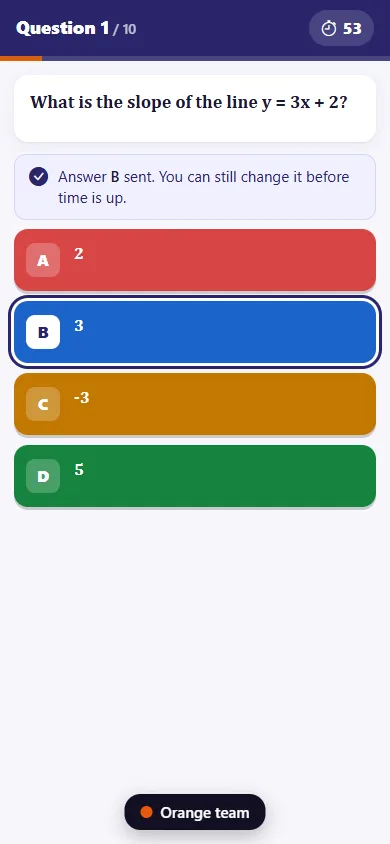
Live quiz: students answer on their phones while the leaderboard updates
In class

Get every student answering

Open a live quiz from your lesson and put the QR code on the board. Students answer on their own phones and see the leaderboard between questions. Where phones are not allowed, hand out printed A/B/C/D cards and scan the room with your phone camera.

  • Each result lands in the gradebook, so you know who needs help next lesson.
  • Board mode keeps the buttons large enough for an interactive display.
Drafting a test from one sentence, then reviewing the questions
Before class

Draft tests and homework in minutes

Describe what you need in one sentence. The assistant proposes topics, question types and difficulty; you change the mix, then read and edit every question before anything reaches students.

  • Objective questions are scored against your answer key the moment a student submits.
  • For paper tests, print QR answer sheets and scan them with your phone.
How test drafting works
A lesson with an embedded simulation being explored
Lessons

Lessons students explore, not just read

Put slides, videos, files and a simulation from simulic.com into one lesson. Show the simulation on the board, then set it as homework so students try it themselves.

  • Students open everything in the browser, with nothing to install.
  • Reuse a lesson in your next class instead of building it again.
How to build an interactive lesson
QR attendance, then the weekly report a parent receives
After class

Attendance, grades and parent notes without the paperwork

Students check in by scanning a QR code that changes every few seconds. Tap participation notes during the lesson, and the session report drafts a note for each student, which you check before it goes to parents by email.

  • The gradebook collects quiz, test and homework scores by itself.
  • Issue end-of-course certificates that anyone can verify by QR code.
How attendance and reports work

What a personal workspace includes

The teaching side of CLASSQR, for one teacher. The limits of each plan are listed under pricing.

Teaching on your own today, running a center tomorrow?

Tuition billing, a public website, enrollment leads and staff roles belong to centers, so a personal workspace leaves them out. When you are ready, turn your workspace into a center from its settings: classes, students, tests, grades, AI credits and your web address stay where they are.

See what centers get

Pricing

Teach on your own

For a teacher with their own classes. Turn your workspace into a center whenever you grow.

Free (personal)
$0

Your own classes and students, free with no time limit.

  • Up to 40 students and 5 classes
  • Lessons, question bank, tests and exams, marking, gradebook, QR attendance
  • 40 AI credits a month
  • Simulic simulations, always free
Start for free

AI credits reset every month. Need more? Extra credit packs from $9.99.

Frequently asked questions

Is it really free?

Yes. A free personal workspace covers up to 40 students and 5 classes, with no time limit and no credit card. The Teacher plan raises that to 150 students and 10 classes for $48 a year.

Do my students need to install anything?

No. Students join your class with a link or QR code you share and work in the browser. You can also import a class list from Excel, and the system creates an account and a student ID for each student.

Can I use it when students have no phones?

Yes. Print answer cards so each student holds up A, B, C or D, and scan the class with your phone camera. For tests, print QR answer sheets and scan them after class.

Who owns the lessons and tests I create?

You do. CLASSQR does not publish or resell what you create.

Does the test drafting assistant cost extra?

Drafting uses AI credits. Each plan includes a monthly allowance, listed with the plans above, and you can buy more credits when you need them.

Can I start alone and grow into a center?

Yes. In your workspace settings, open Plans and choose Turn into a center. Classes, students, tests, grades, AI credits and your web address all stay. A paid Teacher plan stops renewing, and its unused days come off your first Standard or Pro invoice. A free workspace gets a 14-day Pro trial if you have not had one.

Set up your first class today

Create a free workspace, add a class and run your first quiz in the same lesson.

Start free